Word game extensions for Chrome, Edge and Firefox
Vowelkit has two free word game extensions for Chrome, Edge and Firefox. The word finder turns up to 15 letters into the best words they make, with points, and works offline. The daily game puts today's five-letter puzzle and three bonus rounds a day in your toolbar. Neither one has ads, an account or tracking.
Vowelkit: Word Finder & Unscrambler
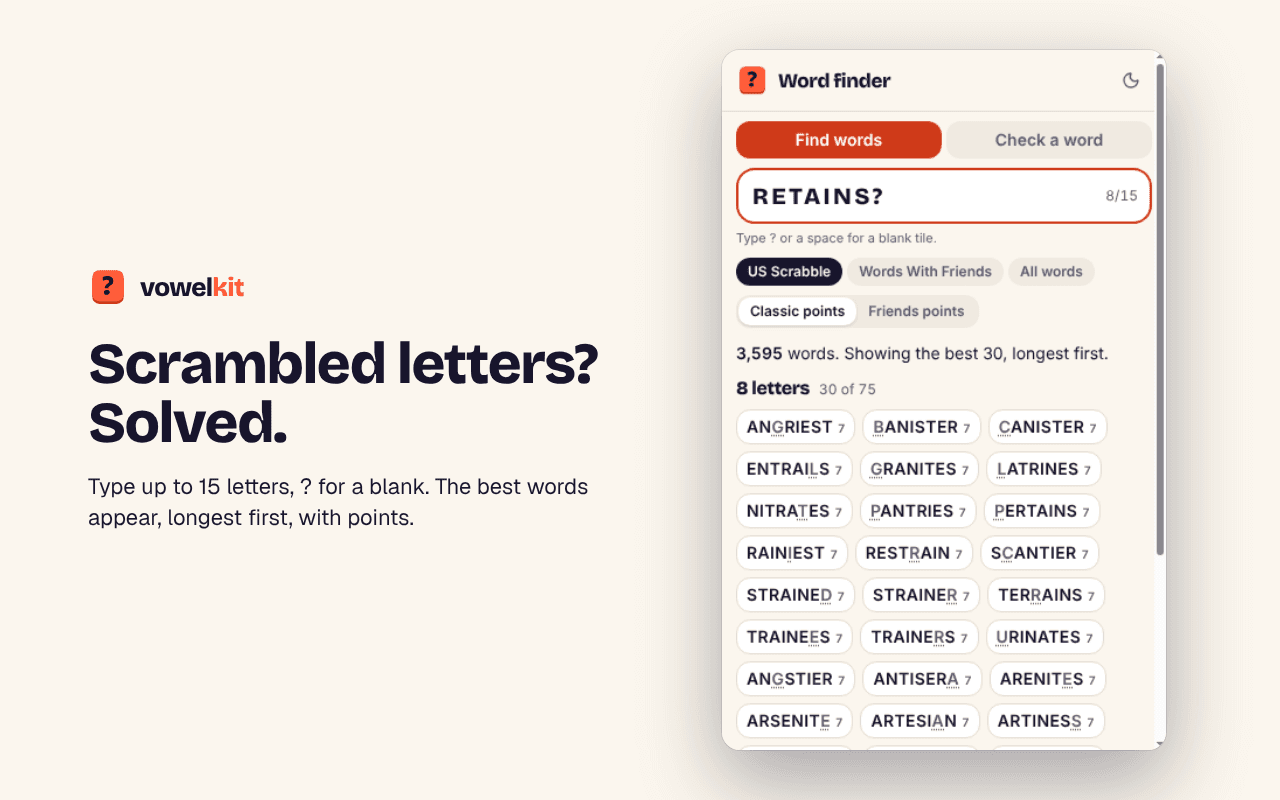
Type your letters, get the best words they make, longest first, with points. Works offline.
- Up to 15 letters, ? for a blank tile
- The best words, longest first, with points
- Every word and filters one click away on vowelkit.com
- Right-click any word on a page to check it, or any letters to unscramble them
- Works offline after the first use
Vowelkit: Daily 5-Letter Word Game
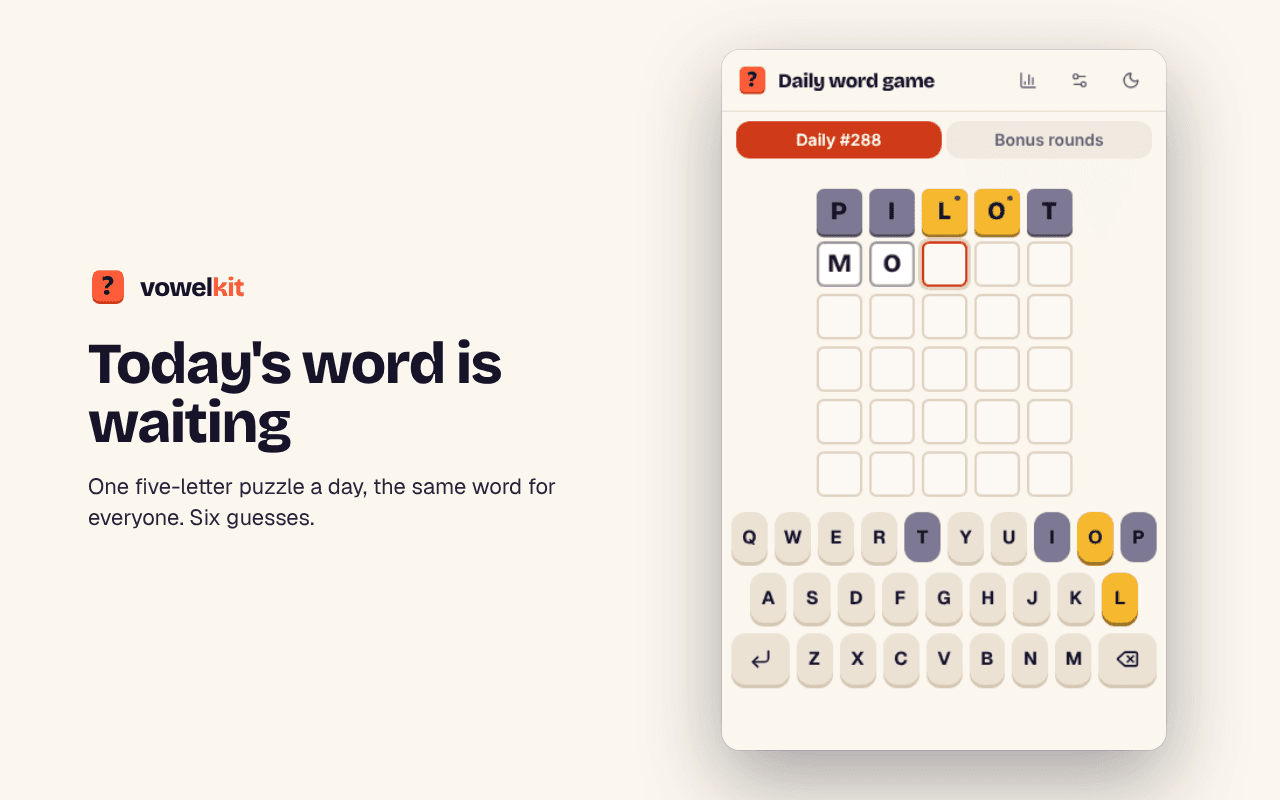
Play the daily Vowelkit puzzle and three bonus rounds a day from your toolbar.
- Today's Vowelkit puzzle, the same word as on the site
- Three bonus rounds a day, even offline
- Streaks and stats in your browser
- A small dot on the icon when a new puzzle is out
How to install a word game extension
- Pick your browser's button above: Add from Chrome Web Store, Add from Microsoft Edge Add-ons or Add from Firefox Add-ons.
- On the store page, add the extension. It asks for no access to your sites.
- A Vowelkit welcome page opens once, with three quick steps. This is the only tab the extension ever opens by itself.
- Pin it: click the puzzle piece icon next to the address bar, then the pin next to Vowelkit, so the coral tile is always one click away.
How to use the word finder extension
- Click the coral tile. The popup opens on the Find words tab with the letter box ready.
- Type up to 15 letters. Type ? or a space for a blank tile. Words appear as you type; there is no button to press.
- Pick a dictionary: US Scrabble, Words With Friends or All words. The points follow it, and you can still switch between Classic points and Friends points by hand.
- Read the best words, longest first, each with its points. A letter with a dotted underline is played by a blank.
- For the full list, use the button under the results (See all words on vowelkit.com) or the link Filter by start, end or length on vowelkit.com.
- To check one word, open the Check a word tab and type it. Or select text on any page, right-click, and choose Find words with Vowelkit or Check this word.
Worked example: KITCHEN in the word finder
Type KITCHEN into the word finder extension with the default dictionary and classic points. It finds 82 words and shows the best 14: the 3 longest lengths.
| Length | Words | Top words (points) |
|---|---|---|
| 7 letters | 2 | KITCHEN (16), THICKEN (16) |
| 6 letters | 1 | ETHNIC (11) |
| 5 letters | 11 | THICK (14), KENCH (14), KETCH (14) |
So the popup shows 2 + 1 + 11 = 14 words, and the other 68 shorter ones are one click away: open KITCHEN in the word finder to see all 82. The check works the same way: QI comes back valid, worth 11 classic points and 11 Friends points.
How the daily game extension works
The daily game is Vowelkit's own five-letter word puzzle: one hidden word a day, the same for everyone, and 6 guesses to find it. Green means the right letter in the right spot, and gold with a dot means the letter is in the word but somewhere else.
- The popup has two tabs: Daily, with today's puzzle number, and Bonus rounds.
- You get 3 bonus rounds a day, each with 5 letters. They work offline; the daily puzzle needs a connection, because the answer stays on the server until your round is over.
- A new puzzle and new bonus rounds arrive at midnight, your time. A small dot on the icon tells you.
- Settings has Hard mode (every clue you find must be used in the next guess) and Colour-blind mode (orange and blue instead of green and gold).
- After a round, Share result copies a spoiler-free grid, and Your stats shows Played, Win %, Streak and Best streak.
New to this kind of puzzle? The how to play guide explains the colours with examples.
Extension or website: what each one does
The extensions are the quick version. They answer in one click and send you to the site when you want everything.
| Task | In the extension | On vowelkit.com |
|---|---|---|
| Words from your letters | The best 30 words at most, from the 3 longest lengths | Every word, with filters for start, end, contains and length (word unscrambler) |
| Checking a word | Valid or not, with classic and Friends points | The same verdict plus anagrams and hooks (word checker) |
| Daily puzzle | Today's word, streak and stats kept in your browser | Today's word, the leaderboard and full stats (daily puzzle) |
| Extra rounds | 3 bonus rounds a day, 5 letters | Unlimited rounds, 3 to 11 letters (Unlimited) |
Tips for both extensions
- Check before you play. Select a word on any page, right-click and choose Check this word. ZA, for example, comes back valid in both lists. If you select several words, the first one is checked.
- Select letters straight from a page. Find words with Vowelkit keeps the letters A to Z and up to 2 question marks as blanks, uses the first 15 letters, and shows the best 10 words in a small card.
- Pick up where you left off. The word finder remembers your last letters, so reopening the popup shows the same rack and results.
- Use the dot as your reminder. The daily game shows a small dot on its icon until you open today's puzzle, so a streak is hard to forget.
Permissions and privacy
Neither extension asks for access to any website, and neither contains ads, analytics or tracking code. These are all the permissions they request.
| Extension | Permission | What it is for |
|---|---|---|
| Word finder | storage | Saves your last search, stats, streak and settings in your browser. |
| Word finder | contextMenus | Adds the two right-click items for text you select. |
| Word finder | activeTab | Gives one-time access to the tab you right-clicked in, so the result card can show there. |
| Word finder | scripting | Puts that small result card into the tab, only after you pick a Vowelkit menu item. |
| Daily game | storage | Saves your last search, stats, streak and settings in your browser. |
| Daily game | alarms | Wakes the extension at midnight, your time, to show the dot for the new puzzle. |
Your searches, rounds, stats and settings stay in your browser. The word finder downloads its word list once (about 390 KB) and then works offline. The daily game sends only the puzzle number, your guesses and a random round number to vowelkit.com to get the colours; the server keeps that round for two days. In Firefox, the daily game asks you to allow this before your first daily guess. Details are in the privacy policy.
Word lists and fair play
The word finder uses NWL2023, the word list for club and tournament play in the US and Canada, licensed from NASPA, and ENABLE, a public domain list. Offensive words are left out. The daily game uses Vowelkit's own five-letter lists; the about page says where every list comes from.
The extensions cannot know another game's private word list, so a word they call valid can still be refused elsewhere. A word finder is fair for practice, study and solo play; in a game against someone else, agree first whether helpers are allowed.
Guide updated November 12, 2026.
Related tools on Vowelkit
- Word checker: the verdict for one word, with its anagrams and hooks, when the popup's check is not enough.
- Anagram solver: words that use all of your letters, for a rack you want to play in full.
- Today's puzzle: the same daily word as the extension, with the leaderboard.
- Unlimited: more rounds once the 3 bonus rounds are used.
Word game extension questions
- Are the Vowelkit extensions free?
- Yes. Both are free, with no ads, no account and no sign-in.
- Does the word finder extension work offline?
- Yes, after the first use. It downloads its word list once (about 390 KB) and then finds and checks words with no connection. In the daily game, the 3 bonus rounds work offline; the daily puzzle needs a connection.
- What data do the extensions collect?
- Nothing that identifies you. Your searches, rounds, stats and settings stay in your browser. The daily game sends only the puzzle number, your guesses and a random round number to vowelkit.com to get the colours; the server keeps that round for two days and nothing that identifies you.
- Does the word finder read the pages I visit?
- No. It only sees the text you select when you choose Find words with Vowelkit or Check this word from the right-click menu, and only in that tab.
- Which word list does the word finder use?
- By default the current North American word list used in Scrabble clubs and tournaments, so newer words such as QI, ZA and OK are included. You can switch to the Words With Friends list (ENABLE) or to all words.
- How many rounds can I play in the daily game extension?
- One daily puzzle and 3 bonus rounds a day, all with 5 letters and 6 guesses. New ones arrive at midnight, your time. Unlimited rounds are on vowelkit.com.
- Is this the official Wordle, Scrabble or Words With Friends?
- No. Vowelkit is independent and not affiliated with The New York Times, Hasbro, Mattel or Zynga.